Passwort Sicherheit
[!toc] Table of Contents
Prinzipiell sind gute Passwörter natürlich unvermeidbar. Was ein gutes Passwort ist, behandeln wir weiter unten.
- Passwörter sichern verschlüsselte Daten zB auf Festplatten oder Passwortdatenbanken
- Passwörter schützen Online-Accounts gegen unbefugte Zugriffe (nicht staatlicher Akteure!)
- Passwörter hindern Behörden fast nie davor, in ungesicherte Social-Media Accounts wie Instagram, Twitter, Reddit, Tiktok und so weiter, hinein zu kommen. Dafür reicht ihnen ein richterlicher Beschluss, denn dort liegen eure Daten unverschlüsselt und deshalb brauchen sie dafür euer Passwort nicht.
[!success] General rules {static}
- Passwörter nicht wiederverwenden
- Starke Passwörter verwenden
- 2-Faktor-Authentifizierung nutzen
Deshalb ist es für uns als moderne Aktivist*innen eine regelrechte Pflicht einen Passwort Manager zu benutzen. Denn der hilft uns dabei, all diese Anforderungen ohne große Schwierigkeiten umzusetzen. Damit schützen wir nicht nur unsere eigenen Zugänge, sondern auch die dahinter liegenden Informationen, die mit unseren Genoss*innen verknüpft sind!
In diesem Artikel erklären wir:
- Was ein Passwortmanager so kann
- Was ein gutes Passwort ist
- Was 2 Faktor Athentifizierung bedeutet und warum wir es empfehlen
Passwortmanager
Ein Passwortmanager speichert alle Passwörter in einer, mit einem Hauptpasswort, verschlüsselten Datenbank (das ist auch nur eine Datei). Dadurch liegen eure Passwörter nicht einfach in Klartext auf eurem System, oder auf Papier in eurer Wohnung und ihr müsst sie euch nicht alle selber merken.
Da ihr euch Passwörter nicht mehr selbst merken müsst, ist es kein Problem und auch empfohlen, dass ihr für jeden Account ein eigenes, starkes Passwort generiert. Das ist mit dem Passwortmanager selbst sehr einfach zu machen.
Der Passwortmanager speichert auch die Zuordnung zu Webseiten & Apps, für die ihr das jeweilige Passwort generiert habt. Das erschwert so auch Phishing, weil das Passwort auf einer falschen URL nicht als Vorschlag angezeigt wird.
Wie oben schon erwähnt ist der Passwortmanager selbst durch ein starkes Hauptpasswort, und/oder andere Faktoren geschützt (s. unten 2-Faktor-Authentifizierung). Dies ist damit (neben dem der Festplattenverschlüsselung) das einzige Passwort, das ihr euch wirklich merken müsst und kann dementsprechend auch etwas komplexer sein. Es gilt nämlich: lieber ein starkes Passwort merken, als viele unsichere Passwörter.
[!tip] Which password manager? {static}
Schau in unsere Empfehlungen zu Passwortmanagern.
Starke Passwörter
Okay, aber zumindest ein starkes Passwort für den Passwortmanager braucht ihr ja trotzdem. Aber ab wann ist ein Passwort denn stark?
Eine Wichtige Grundvoraussetzung ist, dass das Passwort zufällig generiert ist. Alles was du dir ausdenkst, egal wie clever dein System sein mag, ist als unsicher zu betrachten.
Optimierte Algorithmen ermöglichen es Behörden gezielt nach möglichen Passwörtern für Aktivist*innen zu suchen, in dem vor allem Vokabeln, Zitate aus revolutionären Schriften und Liedern usw gezielt durchprobiert werden, während dort zB an faschistischem Vokabular und damit an Zeit und Energie gespart werden kann.
“Die Geschichte ist eine Geschichte von Klassenkämpfen” hat zwar 7 Wörter, ist aber aus den genannten Gründen ein denkbar schlechtes Passwort!
Hier erkennt ihr aber schon, dass es bei dem Begriff Passwörter auch um Passphrasen geht. Passphrasen sind zufällig generierte Wörterketten. Sie haben den Vorteil, dass Menschen sich dadurch viel Längere Zeichenketten im Kopf merken können.
[!tip] A good password is {static}
- Ein gutes Passwort sollte mindestens eine Entropie von 120 bits haben. Das ist ein bisschen mehr als die übliche Empfehlung von 80-100 bits, aber das sollte die Passwörter gegenüber zukünftigen Fortschritten der Hardware wappnen, mit der sie mal versucht werden zu knacken.
- Passphrasen sollten mindestens 5, besser 8 Wörter lang sein.
- Passwörter und Passphrasen sollten mittels Passwortmanagern oder Diceware (Wrfel und einer Liste) erstellt werden.
We explain below where the numbers 5 and 8 come from. There, we look at how long it would theoretically take to crack a randomly generated password or passphrase. However, these tables are always subject to many ifs and buts.
2-factor authentication
2FA ensures that simply entering a password is not sufficient for complete authorization, as it is assumed that passwords may be corrupted. Therefore, a second instance is requested for complete authorization.
The recommendations for password managers include an example scenario showing how a KeePassXC database can be secured with a second factor.
The second factor can be based on various characteristics:
2nd factor: Possession
You need a special device that either displays a number or must be plugged into the computer via USB. If the attacker does not have this “device,” authorization will not be granted. (Hardware tokens, 2FA apps, SMS)
TOTP software
TOTP stands for time-based one-time password and can be set up with all common password managers such as KeePassXC. The login process then consists of entering your username and password, after which you will be asked for the TOTP (e.g., a 6-digit PIN), which changes every ~30 seconds.
USB hardware tokens
These look like normal USB sticks. If a service/hard drive or similar configured with this token is to be unlocked, the stick must also be inserted into the device being used. These tokens are often protected with a PIN, so stealing them is not enough. The number of PIN attempts is limited.
Since all of this is implemented and protected at the hardware level, it is a very secure method of authentication. (The relevant standard for security tokens of this type is called FIDO2, the old standard is U2F.)
TOTP hardware tokens
Similar to TOTP software, but not in an app such as a password manager, but as a thumb-sized device. They have a small screen that displays the 4-6 digit TOTP, which changes every ~30 seconds.
When logging in, the code displayed at that moment must always be entered as 2FA. However, the standards for tokens of this type are usually not open source, which is why we do not recommend using them.
SMS
Probably the better-known method. To verify the identity of the user, the respective service sends an SMS to the phone number registered with the account. Since the mobile network cannot be considered secure, we do not recommend this method.
2-factor biometrics
Unique biometric characteristics must be verified during registration (fingerprint, facial recognition, iris scan). Biometric authentication is particularly widespread for smartphones.
However, biometric authentication poses a problem for us in that the authorities can simply use our biometric characteristics under duress and by force. We therefore advise against biometric unlocking methods such as fingerprint and Face ID as a matter of principle.
[!technical] Technical
Bio-metrics such as fingerprints or facial recognition have been proven to be falsifiable. Starbug from the CCC has already demonstrated how easy this is for fingerprints, faces, iris and vein recognition. The most important point here, however, is that you can never change your bio-metric characteristics. A corrupted password can be reset. A fingerprint or face, however, cannot.
The only exception to this is GrapheneOS, which offers a PIN as a second factor limited to twenty attempts for fingerprint recognition and otherwise meets the highest security standards.
2nd factor: Knowledge
For example, the security questions that were common in the past, such as “What is your place of birth?” However, these “security questions” usually imply answers that someone who knows you well could easily find out for themselves. We therefore don’t recommend them.
Time to crack
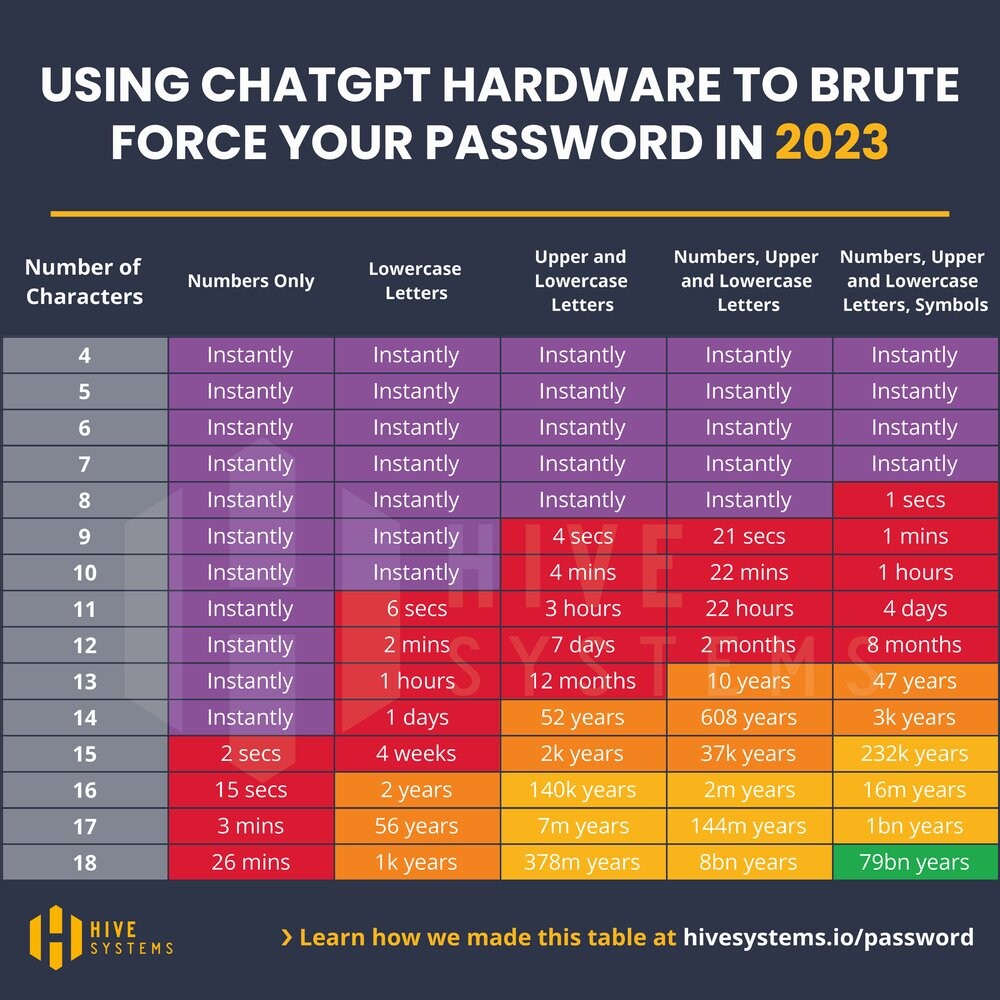
In reality, how long it takes to crack a password depends very much on the exact circumstances. The calculations here assume a very specific scenario. The scenario shown here assumes very favorable conditions for the attackers. This means that in practice, it will take even longer.
Time to crack a password
It should also be noted that these times are for one password from one person. All of the hardware is busy with this task, so no other passwords can be cracked during this time.
[!technical] Technical
We assume an MD5-hashed password and that the attackers have access to the hardware used to train ChatGPT: 10,000 NVIDIA A100 GPUs. Purchase price: approx. $9,000 per unit (2024) for the cheaper version with 40GB of memory. That’s a total of $90 million. Even renting this amount of hardware is not cheaper in the long run. Further details on the scenario can be found at hive-systems, who performed the calculations.
Important prerequisite: The password must have been generated randomly! This means that this is purely character brute forcing. So, for example, you start with 0000 and try:
0001,0002,...,AAAA,AAAB,...,A-A-A-B-B,R€70lut10n,- …
etc. without word lists optimized for the target person.
Time to crack a passphrase
However, a random password that is sufficiently long and contains letters, numbers, and special characters is difficult for humans to remember. That’s why we recommend using passphrases for passwords that you need to remember, such as those for your password manager and the hard drive of your computer and phone. These consist of words instead of individual letters. They are much easier for humans to remember, but are no less secure than passwords. See also: xkcd 936
[!technical] Technical
In information theory, it must always be assumed that the attacker knows how we created the password in order to evaluate its security. Therefore, the attacker uses a word list attack here. Otherwise, everything remains the same.
For example, the word case is assumed below, namely that the attackers know exactly how many words from which language and in which format (i.e., upper/lower case, which characters between words) were used for the password and that they use (in the left column) the hardware used to train ChatGPT to crack it. Therefore, these graphics should not be taken at face value.
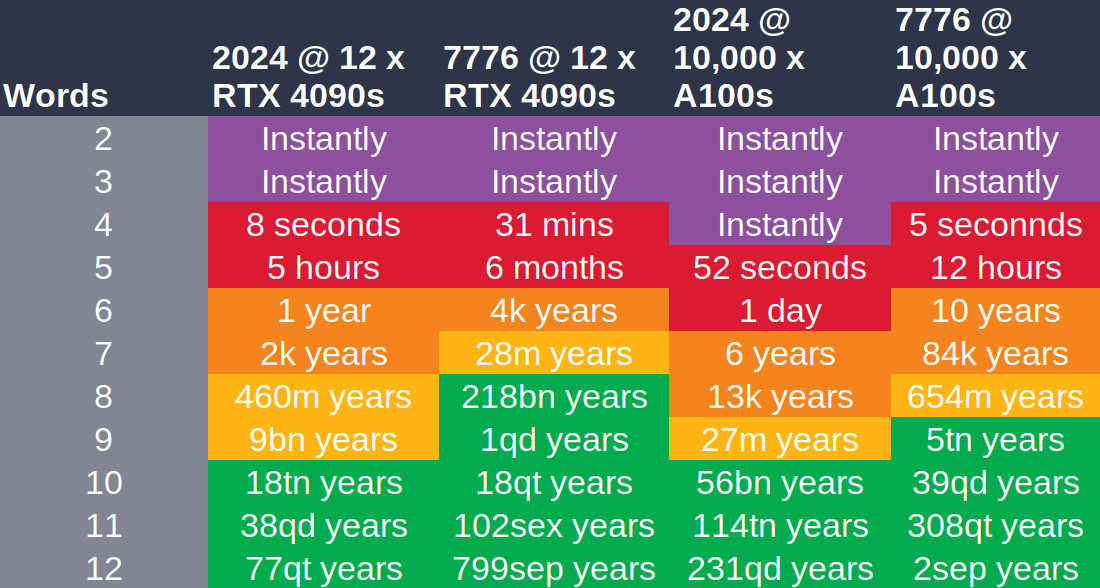
As already mentioned, random passphrases can be created using password managers or, in a similar way, with dice and a word list that is as large as possible.