Phishing
Phishing via email or text message is generally more commonly associated with scams, but government actors also often use phishing to infect targets with malware.
In fact, phishing one of the most common reasons for data leakage.
There are a few things to keep in mind here. One-click malware, where users have to proactively click on a link or download something in order for their device to be infected, is much cheaper than zero-click solutions, where devices can be infected without any further action on the part of the user.
In addition, phishing attacks are relatively difficult to trace. If the phishing is discovered, it usually remains unclear who is behind the attack, which puts the attacker in a fairly secure position.
Being caught secretly bugging someone’s home is much riskier and alerts those affected. Phishing, on the other hand, ends up in all of our inboxes all the time and hardly arouses any suspicion.
Here is an example of fake links created through the clever use of Unicode characters. Can you spot the difference between the links? Which link leads to which page?
As an exception, just for learning purposes, you can now click on the two links to see what happens. Was your guess correct?
The first link does not lead to codeberg.org but to esc-it.org. The @ symbol is used as a username. This should not work if there is a / before the @, but the first link contains Unicode characters that are not “normal” slashes.
Some browsers even display a warning for the incorrect link, as shown here in Firefox:
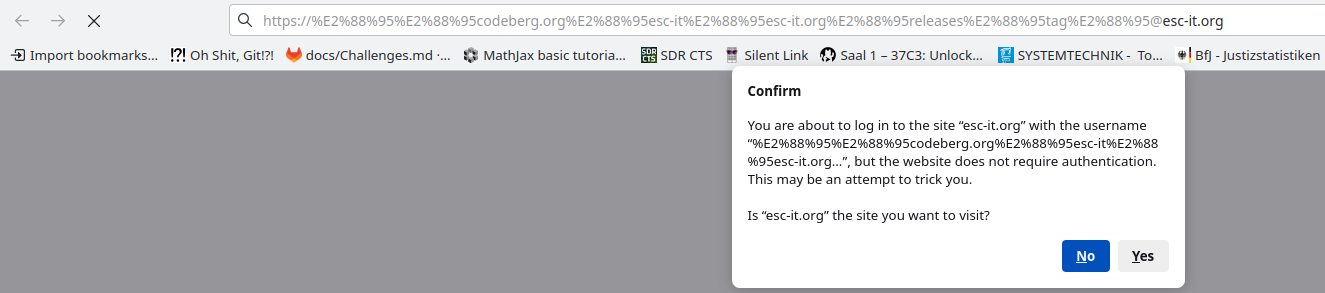
Chromium, for example, does not display such a warning.
What is noticeable about the links is that there is a domain at the end (…@<esc-it.org>). However, this is not a clear sign of a fake and is becoming increasingly difficult to detect with ever-changing top-level domains. Here is an example with a “.zip” extension, so it could be either a .zip file or a .zip domain:
Warning: The first link leads to a domain (1312.zip) that does not belong to us. This means that we do not know what happens there. Therefore, please do not visit this link unless you know exactly what you are doing.
- https:∕∕codeberg.org∕esc-it∕esc-it.org∕releases∕tag∕@v1312.zip
- https://codeberg.org/esc-it/esc-it.org/releases/tag/v1312.zip
Here, too, the first link does not lead to a zip file on codeberg.org, but the second link does. No warning appears here either, because the domain does not yet exist.
- Do not click on suspicious links
- Question the origin of the link. Could it be that this “address” is sending me exactly this link?
- Better safe than sorry - search for the page using verifiable methods. Save original links in your password managers, in bookmarks in your browser, or use search engines.
- If in doubt, type the links manually.
- However, this will not help if the link itself is fake. [systeml1.org] for example will again lead you to the wrong website. Refer back to the point above to determine the correct URL.
Feedback: You have feedback for esc-it.org? Feel free to use our short feedback form.